
 عاجل؟ واتساب مشترٍ عبر الواتساب








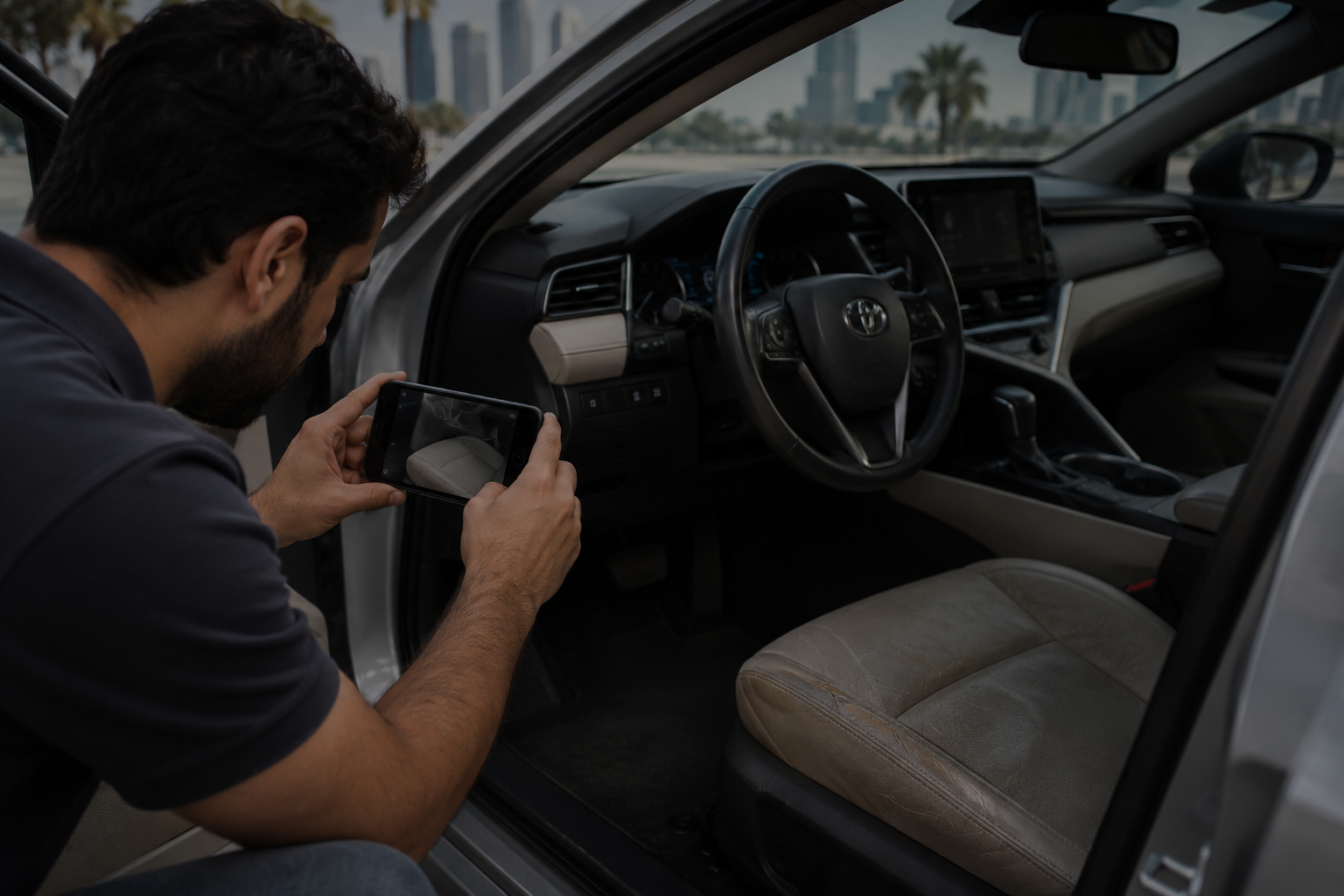
Abu Dhabi Car Selling Platform: How to Record a CLEAR Video Walkthrough
An Abu Dhabi Buyer Requests a Video Walkthrough: Show the Car Clearly Without Calling It an Inspection
Selling a car in Abu Dhabi often starts with an online message or phone call. Sometimes, a buyer asks for a video walkthrough before arranging a meeting. You can show your car through a clear video without calling it a vehicle inspection. A video helps buyers view the car’s appearance, features, and visible condition. However, it cannot replace a physical assessment. When you use an Abu Dhabi car selling platform, you should understand the difference between a video walkthrough and a proper vehicle inspection.
A video walkthrough can make the selling process easier. First, it helps buyers see your vehicle without travelling. Next, it allows you to explain important details. Also, it helps both sides decide whether to arrange a physical viewing.
However, you must keep your descriptions accurate. A video cannot confirm every mechanical or electrical problem. Therefore, you should avoid presenting your recording as proof of the car’s complete condition.
This guide explains how to record a useful car seller video walkthrough. It also covers remote car viewing limits and practical steps for sellers in Abu Dhabi.
Why Abu Dhabi Car Buyers Request Video Walkthroughs
Many people search online before buying a used vehicle. They compare prices, models, mileage, and features. Additionally, they often contact several sellers before choosing a car.
A video walkthrough gives buyers another way to understand your vehicle.
For example, a buyer in Khalifa City may find your car in Al Reem Island. Instead of travelling immediately, the buyer may request a short video.
Similarly, someone in Mohammed Bin Zayed City may want to view your SUV before arranging an appointment.
A clear video can help buyers understand several details:
-
The vehicle’s exterior appearance
-
The visible condition of the interior
-
The dashboard and instrument display
-
The general appearance of the engine compartment
-
The condition of the tyres
-
The appearance of the boot
-
Any visible scratches or dents
-
The operation of selected features
However, the video only shows what the camera captures.
A buyer cannot use the recording alone to confirm the vehicle’s mechanical condition. Therefore, sellers should describe the video as a visual walkthrough.
When using an Abu Dhabi car selling platform, clear descriptions help create realistic expectations.
Understanding a Car Seller Video Walkthrough
يمنحك التعامل مع car seller video walkthrough shows the vehicle through a recorded or live video.
The seller usually walks around the car while holding a phone. During the recording, the seller shows important areas and explains visible details.
For example, you might begin with the front bumper. Next, you can show both sides of the vehicle. After that, you can record the rear bumper and interior.
The purpose remains simple. You want to help the buyer see your car clearly.
However, a video walkthrough does not provide a full technical assessment.
A qualified technician may need equipment, physical access, and testing procedures to assess the vehicle properly.
Therefore, you should avoid calling your video a professional inspection.
Instead, use descriptions such as:
-
Vehicle video walkthrough
-
Exterior and interior viewing
-
Seller-recorded car video
-
Remote visual presentation
-
Used car condition overview
-
Vehicle feature demonstration
These descriptions explain the purpose without promising technical results.
Furthermore, honest wording can reduce misunderstandings during later negotiations.
How an Abu Dhabi Car Selling Platform Supports Remote Viewing
An Abu Dhabi car selling platform can help sellers start conversations with interested buyers.
Some services allow sellers to submit their vehicle details online. Others arrange appointments or communicate through WhatsApp.
For example, a seller may provide the make, model, year, mileage, and general condition.
Next, the buyer may ask for photographs or a short video.
This process can help both parties decide what to do next.
However, sellers should confirm the buyer’s identity and understand the platform’s communication process.
Additionally, sellers should avoid sharing unnecessary personal documents during early conversations.
When exploring options through iCarsU.com, sellers can start the car-selling process by providing their vehicle details and discussing the next steps.
A video may support that conversation when the buyer requests one.
Nevertheless, the buyer must still assess the car properly before relying on its technical condition.
Prepare Your Car Before Recording a Video Walkthrough
Good preparation helps buyers see your vehicle clearly.
However, you do not need to make the car look perfect. Instead, focus on presenting its actual condition.
First, park the vehicle in a safe location.
Choose an area with enough space to walk around the car. Also, avoid blocking roads, building entrances, or other parked vehicles.
Next, remove unnecessary items from the interior.
For example, take away shopping bags, loose papers, and personal belongings.
Additionally, clean the dashboard and windows if necessary.
A clean car helps the camera capture more useful details.
However, do not hide visible damage.
If the vehicle has a scratch, show it clearly. Likewise, mention dents or other visible problems.
This approach helps buyers understand what they may see during an in-person viewing.
Choose a Suitable Recording Location
Lighting makes a major difference.
For example, strong midday sunlight can create reflections on the bodywork. Meanwhile, poor lighting can hide important details.
Therefore, choose a bright location with manageable reflections.
Early morning or late afternoon may provide more comfortable recording conditions.
Also, avoid recording during heavy dust or rain.
In Abu Dhabi, dust can collect on vehicles quickly. Therefore, you may need to clean the windows before recording.
Finally, make sure you can walk safely around the vehicle.
Start Your Car Seller Video Walkthrough With the Exterior
Begin your video by showing the entire car.
First, stand far enough away to capture the front and one side. Next, move slowly around the vehicle.
Avoid turning the camera too quickly.
Fast camera movements make it difficult for buyers to notice details.
Instead, move steadily and keep the car inside the frame.
Show the Front of the Vehicle
Start with the front bumper, bonnet, headlights, and grille.
Additionally, show any visible scratches or marks.
If the bumper has damage, move closer and record that area.
However, avoid making technical statements about damage you cannot assess.
For example, you can say that the bumper has a visible scratch.
You should not claim that the damage has no deeper effects unless suitable evidence supports that statement.
Record Both Sides Clearly
Next, walk along the driver’s side.
Show the doors, mirrors, handles, and body panels.
Then, repeat the process on the passenger’s side.
You should also record any visible dents.
If the car has different paint shades across panels, show the appearance honestly.
However, remember that lighting can affect colours on camera.
Therefore, a buyer may still need an in-person viewing to compare the panels accurately.
Show the Rear of the Car
Move to the rear bumper, boot, and tail lights.
Additionally, open the boot and show the available storage space.
If the boot contains a spare wheel or tools, you can show their presence.
However, do not claim that every item works correctly without checking it.
A complete exterior walkthrough gives the buyer a useful visual introduction.
Show the Interior Without Hiding Important Details
The interior often influences a buyer’s first impression.
Therefore, take enough time to show the seats, dashboard, and cabin.
First, open the driver’s door.
Next, show the driver’s seat, steering wheel, and centre console.
After that, record the passenger seat and rear seating area.
Also, show the floor mats and visible interior trim.
If the upholstery has stains or tears, include those details.
A buyer will appreciate accurate information more than a video that hides obvious problems.
Show the Dashboard and Mileage
The dashboard helps buyers understand the vehicle’s features.
If safe and appropriate, switch on the ignition and show the instrument cluster.
Additionally, display the odometer reading clearly.
However, remember that the screen only shows the mileage reading at that moment.
It does not independently confirm the vehicle’s complete mileage history.
Likewise, a dashboard without visible warning lights does not prove that the car has no faults.
Some problems require diagnostic equipment or further testing.
Therefore, describe only what the video actually shows.
Demonstrate Interior Features Carefully
You may demonstrate selected features during the recording.
For example, you can show the operation of the windows, infotainment screen, and air conditioning controls.
However, a brief demonstration cannot confirm long-term reliability.
A feature may operate during the recording but still need further assessment.
Therefore, keep your comments factual.
Instead of claiming perfect operation, explain what you demonstrate in the video.
This approach supports a more honest car seller video walkthrough.
Understand Remote Car Viewing Limits Before Sharing a Video
Remote car viewing limits are important for every seller and buyer.
A video can show visible details. However, it cannot provide the same information as a complete physical assessment.
For example, a camera may show the engine compartment.
Nevertheless, it cannot determine the condition of every internal engine component.
Similarly, a video may capture the tyres.
However, the footage cannot reliably confirm alignment, balancing, or every hidden tyre problem.
Buyers should understand these limits before making decisions.
A Video Cannot Confirm Mechanical Condition
A vehicle may look clean while having mechanical problems.
For example, the engine might produce unusual sounds under certain driving conditions.
Likewise, the transmission may behave differently after extended use.
A short video may not capture these issues.
Therefore, buyers should arrange appropriate mechanical checks when needed.
Sellers should also avoid describing their recording as a mechanical inspection.
A Video Cannot Fully Assess Accident History
Exterior footage may reveal scratches, dents, and paint differences.
However, it cannot establish a complete accident history.
Some repairs may not appear clearly on camera.
Additionally, the camera angle may hide structural areas.
Therefore, buyers should review relevant records and arrange further checks when necessary.
A seller can provide available documents without making unsupported claims.
A Video Cannot Verify Every Electrical System
Modern vehicles contain numerous electrical components.
For example, an SUV may include sensors, cameras, powered seats, and advanced driver assistance systems.
A short recording cannot test every function properly.
Therefore, the buyer should not treat the video as complete electrical verification.
These remote car viewing limits protect both parties from unrealistic expectations.
Explain Visible Damage During the Car Seller Video Walkthrough
Some sellers worry that showing scratches will reduce buyer interest.
However, hiding obvious damage can create bigger problems later.
A buyer may notice the same scratch during a physical viewing.
As a result, the buyer may question other details in your description.
Instead, show visible damage clearly.
For example, record a scratch on the rear door from two distances.
First, show the whole panel. Next, move closer to the affected area.
This method helps the buyer understand the location and appearance of the damage.
Additionally, mention any visible dents, cracked trim, or worn upholstery.
However, avoid guessing repair costs unless a professional has provided a suitable estimate.
Repair costs depend on the damage, parts, labour, and service provider.
Therefore, keep your descriptions limited to confirmed information.
Avoid Calling a Video Walkthrough a Vehicle Inspection
Words matter during a vehicle sale.
A buyer may interpret the word “inspection” as a promise of technical assessment.
Therefore, sellers should choose accurate descriptions.
A video walkthrough and a vehicle inspection serve different purposes.
A walkthrough shows the vehicle through a camera.
Meanwhile, an inspection may involve physical checks, diagnostic tools, and testing.
The exact scope depends on the inspection provider.
For example, a professional assessment may examine the engine, brakes, suspension, and other components.
However, your phone recording cannot perform these procedures.
Therefore, avoid using phrases such as “fully inspected through video.”
Likewise, avoid claiming that a short walkthrough proves the car has no problems.
Instead, explain that the footage shows the vehicle’s visible condition at the recording time.
This distinction supports clearer communication through an Abu Dhabi car selling platform.
Record a Useful Video Without Expensive Equipment
You do not need professional camera equipment to record a useful walkthrough.
In most cases, a smartphone can capture enough visual detail.
However, recording quality still matters.
First, clean the camera lens.
Next, check the lighting.
Then, hold the phone steadily.
Also, avoid using filters that change the vehicle’s appearance.
Filters may make paint colours look different.
Furthermore, they can hide scratches or reduce visible detail.
Therefore, use natural camera settings whenever possible.
Keep the Camera Steady
Shaky footage makes viewing difficult.
Therefore, hold your phone with both hands when practical.
Move slowly and pause at important areas.
Additionally, avoid sudden changes between close views and wide views.
This simple method helps buyers follow the recording.
Record Clear Audio
You can explain visible details while recording.
However, avoid speaking continuously without showing the relevant area.
Instead, connect each explanation to what the camera displays.
For example, show the front bumper while mentioning its condition.
Also, choose a location with limited background noise.
Clear audio can make the video easier to understand.
Keep the Video at a Practical Length
A useful video does not need to continue for an hour.
Instead, focus on important vehicle details.
For many cars, several minutes may provide a helpful introduction.
However, the required length depends on the vehicle and buyer’s requests.
A larger SUV may need more time than a small hatchback.
Additionally, visible damage may require extra footage.
The main goal is clarity rather than a particular recording length.
Protect Your Privacy During Remote Car Viewing
Privacy matters when selling a vehicle online.
A buyer may request a video before you know much about them.
Therefore, check what appears in the background.
For example, avoid showing your home address, personal documents, or family photographs.
Also, remove visible paperwork from the dashboard.
If your navigation screen displays saved home locations, avoid recording those details.
Additionally, check whether the video reveals personal phone notifications.
You can close unnecessary apps before recording.
Be Careful With Registration Documents
A buyer may request proof of vehicle ownership.
However, you should not automatically send complete personal documents to an unknown contact.
First, understand why the buyer needs the information.
Next, confirm the recipient through a trusted communication channel.
Then, share only the details necessary for the current stage.
For example, a basic video walkthrough usually does not require a copy of your Emirates ID.
Likewise, it does not require your banking information.
Keep sensitive documents separate from the video.
This approach helps protect your information during the early selling process.
Use WhatsApp Carefully When Sharing a Car Video
Many car sellers in Abu Dhabi communicate through WhatsApp.
It provides a convenient way to send photographs, videos, and messages.
However, sellers should check the recipient before sharing files.
First, confirm that you have the correct contact number.
Next, explain what the recording contains.
For example, you can describe it as an exterior and interior walkthrough.
Additionally, mention the recording date when relevant.
This detail helps the buyer understand when you captured the footage.
However, the date alone does not confirm the vehicle’s current condition.
A car may develop new damage or faults after recording.
Therefore, update the buyer if important changes occur.
Also, avoid opening suspicious links from unknown contacts.
A genuine vehicle enquiry should not require you to disclose passwords or banking verification codes.
How Buyers Can Use a Video Before Physical Viewing
A buyer can use video footage to make an early decision.
For example, the buyer may compare the visible condition of two similar vehicles.
Additionally, the buyer may check whether the interior layout meets their needs.
A family buyer might focus on rear seating space.
Meanwhile, another buyer may want to see boot capacity.
The video can answer these basic visual concerns.
However, it cannot confirm every detail about the vehicle.
Therefore, buyers should use the recording as one part of their decision process.
The next stage may involve a physical viewing, document review, or mechanical assessment.
This approach respects remote car viewing limits while keeping the process convenient.
Selling a Car From Different Abu Dhabi Locations
Abu Dhabi includes many residential and commercial areas.
Therefore, buyers and sellers may live far apart.
A video walkthrough can reduce unnecessary travel during the early stages.
Selling a Car in Khalifa City
Khalifa City has many residential properties and parking areas.
A seller may arrange a safe place to record the vehicle.
Next, the seller can share the footage with an interested buyer.
However, the video should not replace necessary physical checks.
Selling a Car in Mohammed Bin Zayed City
Sellers in Mohammed Bin Zayed City may receive enquiries from buyers across Abu Dhabi.
Therefore, a video can help introduce the vehicle before an appointment.
Additionally, buyers can request clear views of important features.
However, sellers should avoid promising technical condition based only on footage.
Selling a Car on Al Reem Island
Some parking areas on Al Reem Island offer limited space or lighting.
Therefore, sellers should choose a suitable recording location.
Also, avoid recording other people’s number plates or personal details unnecessarily.
If the parking area has poor lighting, use another safe location.
Selling a Car Near Mussafah
Mussafah attracts people looking for vehicles, workshops, and automotive services.
A seller may use a video to introduce the vehicle before meeting a buyer.
However, the buyer should still consider appropriate physical checks.
This is especially important when the vehicle has an unclear service history.
Selling a Car Near Yas Island
Buyers near Yas Island may request remote footage before travelling to another area.
Therefore, a clear walkthrough can support early communication.
However, buyers should understand that the recording only presents visible details.
Across these locations, an Abu Dhabi car selling platform can support the initial enquiry process.
Present Used Cars Honestly Regardless of Age
Different vehicles require different levels of explanation.
For example, an older car may have more visible wear.
Meanwhile, a newer vehicle may include additional electronic features.
Therefore, adjust your walkthrough to match the car.
Older Used Cars
For older cars, show visible wear carefully.
Focus on the seats, dashboard, body panels, and tyres.
Additionally, mention any known problems that may affect a buyer’s decision.
However, avoid claiming that age-related wear has no mechanical consequences.
A physical assessment may reveal concerns that the video cannot show.
Newer Used Cars
Newer vehicles often contain modern screens and driver assistance features.
Therefore, buyers may want to see the infotainment system and dashboard.
You can demonstrate selected features.
However, do not claim that the complete system works perfectly after a brief demonstration.
Luxury Cars
Luxury vehicles may include leather interiors, powered seats, cameras, and advanced technology.
Therefore, buyers may request a longer walkthrough.
Show the visible equipment and explain known features accurately.
However, do not assume that every visible option came from the factory.
Check the vehicle’s specifications or supporting records before making that claim.
Hybrid Cars
Hybrid vehicles contain petrol and electrical power systems.
A video may show the dashboard, engine compartment, and general appearance.
However, it cannot properly confirm hybrid battery health.
Therefore, buyers should consider suitable technical checks when assessing hybrid systems.
These differences show why remote car viewing limits matter across vehicle categories.
Keep Vehicle Descriptions Consistent Across Every Platform
Many sellers advertise their cars through multiple channels.
For example, they may use an Abu Dhabi car selling platform, social media, and direct messages.
However, inconsistent descriptions can confuse buyers.
Therefore, keep the important details the same.
Use the correct make, model, and year.
Additionally, provide an accurate mileage reading and update it when necessary.
If you know about an important fault, describe it consistently.
Also, make sure your video matches the vehicle in your advertisement.
A buyer should not receive footage of a different trim or model.
Furthermore, avoid reusing very old videos without explaining their recording date.
Fresh footage can help buyers understand the car’s recent appearance.
However, even recent footage cannot replace a professional vehicle assessment.
Do Not Use Camera Angles to Hide Car Damage
Camera angles influence how a car appears.
For example, a low angle may make an SUV look larger.
Meanwhile, bright reflections may hide surface scratches.
Therefore, record the vehicle from several directions.
Show wide views and closer details.
Additionally, avoid covering damaged areas with your hands or other objects.
If the car has a dent, show it directly.
This approach supports fair communication.
However, the buyer should still examine the vehicle in person.
Some marks may appear differently under natural light.
Likewise, photographs and videos may not show exact paint colours.
Therefore, your recording should support visual understanding rather than promise complete accuracy.
Explain the Difference Between Video Viewing and Test Driving
A video walkthrough shows selected parts of the vehicle.
A test drive allows the driver to experience how the car behaves on the road.
These activities provide different information.
For example, a buyer may hear the engine during a video.
However, that recording cannot fully demonstrate steering response, braking, or suspension behaviour.
Additionally, phone microphones may change how sounds appear.
Therefore, do not claim that an engine sounds perfect based only on recorded audio.
A proper driving assessment may reveal issues that do not appear during stationary recording.
However, sellers should arrange test drives safely.
Before allowing another person to drive, confirm suitable insurance coverage and driver eligibility.
Also, consider using a safe and agreed location.
These steps help protect both parties.
Why a Video Cannot Replace a Vehicle Condition Report
A formal condition report may document the results of specific checks.
Depending on the provider, it may cover mechanical systems, visible damage, and diagnostic findings.
However, the report’s value depends on its scope and methods.
A seller-recorded video does not provide the same testing process.
For example, showing the underside of a car with a phone cannot automatically identify every suspension problem.
Likewise, recording the dashboard does not replace diagnostic testing.
Therefore, buyers should understand the differences.
A video provides visual information.
A condition report records findings from defined assessment procedures.
Neither should promise more than its actual scope.
When a buyer requests proof of technical condition, explain what documents you have.
If you do not have a current assessment report, say so clearly.
This approach helps prevent misunderstandings.
Prepare for Buyer Feedback After the Video
After watching your video, a buyer may request more details.
For example, the buyer may want a closer view of a wheel or door panel.
You can provide additional footage when the request is reasonable.
However, you should avoid repeating unnecessary recordings for unknown contacts.
First, confirm that the enquiry appears genuine.
Next, understand what information the buyer wants.
Then, decide whether a short additional video can help.
Sometimes, a physical viewing offers a better solution.
For example, a buyer may request detailed confirmation of engine condition.
A phone video cannot provide that confirmation.
Therefore, explain the limitation and suggest an appropriate physical assessment.
Clear boundaries help maintain a practical selling process.
Use a Video Walkthrough to Support Price Discussions
Price negotiations often begin before a physical viewing.
A buyer may use photographs and footage to form an initial opinion.
However, video alone cannot establish the vehicle’s complete market value.
Vehicle prices depend on several factors.
These include age, mileage, make, model, specifications, and condition.
Additionally, service history and market demand can influence offers.
Therefore, treat any price discussion before a complete assessment carefully.
A buyer may provide an initial estimate based on available information.
However, that estimate may change after the buyer checks the car.
For example, a physical assessment may identify mechanical faults or previously unclear damage.
Likewise, the buyer may discover positive details that the video did not show.
Therefore, discuss whether the buyer’s price represents an estimate or a firm offer.
When using an Abu Dhabi car selling platform, understanding offer conditions can help avoid confusion.
Avoid Promising a Final Price From Video Footage
Some sellers believe that a detailed video should guarantee a final offer.
However, even clear footage has limits.
A buyer may need to inspect the car before confirming a purchase amount.
For example, the video may show clean bodywork.
Nevertheless, the buyer may later identify a mechanical problem.
Therefore, the final offer may depend on additional checks.
You should also avoid stating that a vehicle has no faults simply because the recording looks good.
Instead, describe the known condition honestly.
If you have supporting service records, mention their availability.
However, service records do not guarantee the absence of current faults.
This careful approach helps buyers understand the information behind the asking price.
The Importance of Service History During Remote Car Viewing
Service records can support a used car sale.
They may show maintenance dates, workshop details, and completed work.
For example, records may identify oil changes, brake repairs, or scheduled maintenance.
Therefore, buyers may request service information alongside a video.
However, you should review documents before sharing them.
Remove unnecessary personal details when appropriate.
Additionally, avoid claiming a complete service history when records have gaps.
If you only have documents for certain years, explain that limitation.
Likewise, distinguish between workshop invoices and manufacturer service records.
These documents may provide different types of information.
A video can show a service booklet or document cover.
However, footage alone cannot verify the authenticity of every record.
Therefore, buyers should examine relevant documents when necessary.
How to Record a Clear Walkthrough for an SUV
SUV buyers may focus on different features from sedan buyers.
For example, they may want to see passenger space and cargo capacity.
Therefore, adjust your video accordingly.
First, show the complete exterior.
Next, open the front and rear doors.
Then, display the seating arrangement.
If the SUV has a third row, show it clearly.
Additionally, open the boot and demonstrate the available cargo space.
You may also show the folding seats.
However, do not claim a specific load capacity unless you have reliable vehicle specifications.
Likewise, avoid claiming off-road capability from appearance alone.
Different SUV models have different systems and limitations.
A video can demonstrate visible features.
However, it cannot confirm the condition of the four-wheel-drive system or suspension.
Therefore, keep your explanation accurate.
How to Present a Sedan Through Video
Sedan buyers often focus on comfort, condition, and running costs.
A video cannot confirm every operating cost.
However, it can help present visible features.
Start with the exterior.
Next, show the bonnet, boot, and body panels.
Then, record the front and rear seating areas.
Additionally, show the dashboard and available climate controls.
If the seats have wear, include that detail.
Also, record visible marks around the door handles and bumpers.
However, avoid presenting normal appearance as proof of mechanical reliability.
A well-maintained appearance may create a positive first impression.
Nevertheless, proper technical checks remain important.
Video Walkthroughs for Cars With Visible Damage
Some sellers want to sell vehicles that have dents, scratches, or other damage.
A video can help explain the visible condition before an appointment.
First, show the entire vehicle.
Next, focus on the damaged areas.
Then, explain what you know about the damage.
However, avoid making unsupported claims about safety or repair costs.
For example, a damaged bumper may look minor on camera.
Nevertheless, the footage cannot confirm the condition of every component behind it.
Therefore, do not describe the damage as purely cosmetic without suitable evidence.
If you have repair quotations or relevant reports, you may discuss them separately.
Also, explain whether the vehicle currently operates.
However, distinguish between your own observations and a technician’s assessment.
This approach gives buyers more useful information.
Common Mistakes During a Car Seller Video Walkthrough
A poor video can create confusion rather than clarity.
Therefore, avoid common recording problems.
Recording only the best side: Show every side of the car rather than focusing on attractive angles.
Moving too quickly: Slow movements help buyers notice visible details.
Using heavy filters: Natural footage gives buyers a more realistic view.
Ignoring scratches: Show visible damage instead of hiding it.
Making unsupported claims: Describe observations without guaranteeing technical condition.
Sharing personal information: Check the video background before sending it.
Using outdated recordings: Explain when you recorded the video.
Calling the recording an inspection: Use accurate terms that reflect the actual process.
These improvements can make your footage more useful.
Additionally, they help you manage buyer expectations during the selling process.
How Clear Videos Can Reduce Unnecessary Appointments
Some buyers arrange physical viewings before understanding a vehicle’s basic appearance.
However, a short video can answer simple visual concerns.
For example, a buyer may discover that the vehicle lacks a desired interior feature.
Likewise, the buyer may notice visible wear that affects their interest.
Therefore, the video can help both parties decide whether to continue.
This may reduce unnecessary journeys across Abu Dhabi.
For example, a buyer travelling from Baniyas to Al Bateen may appreciate an early visual overview.
However, the video should never serve as a replacement for necessary technical checks.
Instead, use it to support the first stage of communication.
A serious buyer can then arrange further viewing or assessment.
Using iCarsU.com During Your Abu Dhabi Car Sale
Selling a used car involves several decisions.
First, you need to understand your vehicle’s details.
Next, you need to choose how to approach potential buyers.
Then, you need to discuss condition, price, and transaction arrangements.
An Abu Dhabi car selling platform such as iCarsU.com can provide a starting point for sellers who want to explore a car sale.
You can begin by sharing essential vehicle information.
For example, prepare the make, model, year, mileage, and general condition.
Additionally, identify any known issues that a buyer should understand.
If a buyer requests a video walkthrough, you can prepare a clear visual recording.
However, explain that the video shows only the areas you capture.
Do not describe the recording as an inspection report.
Instead, keep the purpose simple and transparent.
This approach can help you communicate clearly while moving toward a possible sale.
Keep the Buyer Informed When the Car’s Condition Changes
Vehicle condition can change after you record a video.
For example, the car may develop a new warning light.
Likewise, a minor parking incident may cause a scratch.
Therefore, update interested buyers when important changes occur.
First, explain what changed.
Next, provide new photographs or footage when useful.
Then, discuss whether the change affects the planned viewing.
However, avoid assuming that every new problem has a simple explanation.
A warning light may require diagnostic testing.
Similarly, new noises may need mechanical assessment.
Therefore, describe the symptoms without guessing the cause.
Clear updates help the buyer understand the car’s current condition.
They also reduce the risk of disagreements during the physical viewing.
Choose the Right Next Step After Remote Viewing
A useful video walkthrough should lead to a clear next step.
However, that step depends on the buyer’s needs.
Some buyers may want another video of a specific feature.
Others may request service records.
Meanwhile, serious buyers may prefer to arrange an in-person viewing.
Therefore, discuss the next stage before making commitments.
If the buyer wants a technical assessment, clarify who will arrange it.
Additionally, confirm the proposed location and any relevant costs before proceeding.
If the buyer makes an offer, understand its conditions.
For example, check whether the amount depends on inspection results.
Also, confirm how the parties will handle payment and ownership transfer.
In Abu Dhabi, sellers should use the applicable official procedures to complete vehicle ownership changes.
Do not release the vehicle or keys merely because someone sends an unverified payment screenshot.
Instead, independently confirm receipt of cleared funds and complete the required transfer arrangements.
These precautions support a safer transaction.
Build Buyer Confidence Through Accurate Information
Buyer confidence comes from consistent and clear communication.
A good video can help. However, honest descriptions matter even more.
For example, show the car’s visible condition without exaggeration.
Additionally, explain what you know about its service history.
If you cannot confirm a detail, say so.
Avoid guessing about mechanical condition or repair history.
Likewise, do not promise that a vehicle will pass every future assessment.
A seller cannot establish that through a short recording.
Instead, allow the buyer to arrange suitable checks.
Also, keep your advertisement consistent with your video.
If you describe a feature online, make sure the vehicle actually has it.
These simple practices can make the car-selling process more transparent.
Remember Remote Car Viewing Limits Throughout the Sale
Remote car viewing limits remain important even after a buyer watches several videos.
More footage may improve visual understanding.
However, additional footage does not automatically provide technical verification.
For example, multiple engine videos cannot replace appropriate mechanical checks.
Likewise, close views of body panels cannot confirm every hidden repair.
Therefore, treat video as a supporting tool.
It can help buyers understand appearance and selected features.
Additionally, it can support early communication and appointment planning.
However, it cannot guarantee condition, value, or future reliability.
A physical assessment may still reveal issues.
Both parties should understand these limits before making final decisions.
Make Your Abu Dhabi Car Sale Clear From the Beginning
A buyer’s request for a video walkthrough does not need to complicate your car sale.
Instead, use the request to present your vehicle clearly.
Start with a safe recording location.
Next, show the exterior, interior, dashboard, and visible features.
Additionally, include scratches, dents, or other known problems.
Use steady camera movements and natural lighting.
However, do not treat the video as a technical inspection.
A recording shows what the camera captures. It does not confirm everything about the vehicle.
Therefore, explain the purpose of your footage clearly.
When selling through an Abu Dhabi car selling platform, accurate information can support better communication.
A car seller video walkthrough can help interested buyers decide whether to arrange a physical viewing.
Meanwhile, understanding remote car viewing limits helps prevent unrealistic expectations.
If you want to start selling your vehicle in Abu Dhabi, visit iCarsU.com and provide your car details.
A clear video, honest description, and suitable follow-up assessment can help you approach the sale with greater confidence.
Can I use an Abu Dhabi car selling platform to share a video walkthrough with several interested buyers?
Yes, you can share the same car video walkthrough with multiple interested buyers in Abu Dhabi. However, make sure the recording accurately reflects your vehicle’s current condition. Additionally, remove personal information before sharing the footage. If your car develops new damage, update the video or inform buyers. You can also use iCarsU.com to start your car-selling enquiry and discuss the next steps.
Should I include the car’s registration number in a car seller video walkthrough?
You do not need to display the complete registration number during an initial car seller video walkthrough. Instead, focus on the vehicle’s exterior, interior, mileage, and visible condition. Additionally, protect your personal information when sharing footage with unknown buyers. If a serious buyer needs registration details for verification, discuss a secure way to share the necessary information.
Can an Abu Dhabi buyer request a live car seller video walkthrough instead of a recorded video?
Yes, buyers in Abu Dhabi may request a live video call to view your vehicle. A live walkthrough allows buyers to request different camera angles and closer views of specific features. Additionally, it helps them ask for immediate visual demonstrations. However, live footage still has remote car viewing limits. It cannot replace a physical inspection or confirm the vehicle’s complete mechanical condition.
Do remote car viewing limits affect how buyers evaluate a used car with high mileage?
Yes, remote car viewing limits become especially important when buyers assess high-mileage vehicles. A video may show the odometer, bodywork, and interior wear. However, it cannot confirm the condition of the engine, transmission, or suspension. Therefore, buyers should review available maintenance records and consider a physical assessment. Sellers should also describe known problems clearly rather than relying only on video footage.
Can I refuse a buyer’s request to record another car seller video walkthrough in Abu Dhabi?
Yes, you can decline additional video requests if they seem unnecessary, intrusive, or unsafe. However, explain your decision politely and offer reasonable alternatives. For example, you can share existing photographs or arrange a suitable physical viewing. Additionally, you can provide specific vehicle details through a trusted communication channel. An Abu Dhabi car selling platform can help you begin the selling process without requiring you to satisfy every remote viewing request.
إضافة تعليق إلغاء الرد
You must be logged in to post a comment.
تصنيفات
- أبو ظبي (2)
- تاريخ الحوادث (2)
- الحوادث (4)
- أخبار السيارات (1)
- تسجيل السيارات (1)
- خليجي (4)
- مستورد (4)
- بيع سيارة (1)
- المواصفات (2)
- غير مصنف (20٬900)
- مشتري سيارات مستعملة (105)
أحدث المنشورات
منشورات ذات صلة
Two Cars to Sell in Abu Dhabi: Which Enquiry Should You Prepare First?
iCarsU.com
نوفمبر 6, 2026
Sell My Car TODAY in Abu Dhabi: Handling IMMEDIATE Collection Discount Requests
iCarsU.com
نوفمبر 6, 2026
Hybrid SUV Sale in Abu Dhabi: Verify Seating Layout Before Advertising
iCarsU.com
نوفمبر 6, 2026
نعمل عن طريق المواعيد فقط. يرجى الاتصال أو إرسال رسالة نصية لترتيب موعد أولاً
مناطق الخدمة: أبو ظبي (المكتب الرئيسي)، دبي، الشارقة، عجمان، رأس الخيمة، الفجيرة، أم القيوين.

 English
 Arabic